

August 14, 2026
We built a Copilot in Excel variance-review skill. Here is the test pack

DIY starter kit
Run the Copilot variance-review test yourself
The starter kit includes the skill used in this test, a synthetic monthly variance workbook, and a short README. Open the README first, then run the skill against the workbook.
Inside the ZIP
- README with the test sequence
- Monthly variance-review skill
- Synthetic evaluation workbook
AI-Experts-Copilot-Excel-Variance-Review-Starter-Kit.zip
Microsoft buried one of the more useful Copilot in Excel updates inside a Markdown file.
A custom skill can now tell Copilot how your team wants a recurring job done. That includes the boring instructions that separate a finance process from a spreadsheet demo: which columns are required, what counts as material, when to stop, and what evidence has to follow a conclusion.
So we built a monthly variance-review skill and a workbook designed to trip it up.
The download includes the skill, a .Rules sheet, 60 rows of synthetic budget data, six expected findings, and five test cases.
What is a skill?
A skill to an agent is as a recipe is to a chef - this chef is Copilot, the recipe tells it how to cook your desired dish.
Microsoft's custom skills are folders stored in OneDrive. Each folder contains a SKILL.md with instructions for the task. Copilot can call a skill by name from the workbook editing pane.
Excel also supports a visible worksheet named .Rules. That sheet stays with the workbook and tells Copilot how to handle that particular file.
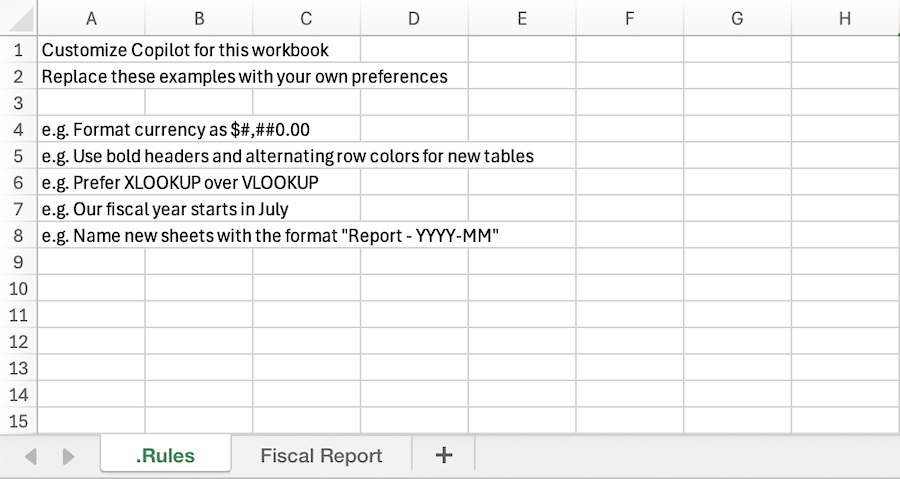
A visible .Rules sheet carries workbook-specific instructions. Source: Microsoft.
We put the review method in the skill: required inputs, variance logic, evidence standards, output sheets, and stop conditions. The .Rules sheet holds the choices for this workbook: August 2026, USD, a $50,000 amount threshold, a 10 percent threshold, and an instruction to leave the source table alone.
If the controller changes materiality, the team edits .Rules. If the evidence standard changes across every monthly review, the team edits the skill. Nobody has to hunt through a 900-word prompt to find the sentence that matters.
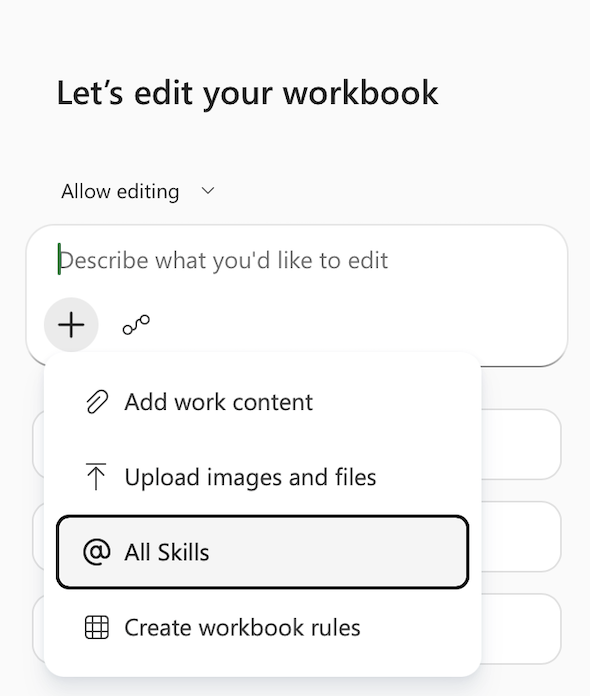
Copilot in Excel exposes skills and workbook rules as separate options in the Add work content menu. Source: Microsoft.
One row tells you whether the review is trustworthy
The workbook includes an $87,000 cloud-cost overrun. There is no supporting note explaining why it happened.
A bad AI review will write something polished about higher usage, unexpected demand, or infrastructure growth. Any of those explanations could be true. None is in the workbook.
The skill tells Copilot to label that row Needs evidence and move on, instead of filibustering like a politician on trial. It may not invent a cause.
Finance teams can already produce plausible explanations, but the AI assistant needs to know when to stop.
Therefore, this variance skill uses three labels:
Supportedmeans a note or source field backs the explanation.Needs evidencemeans the number is valid but the explanation is missing.Data issuemeans the input itself needs attention.
Microsoft's Finance Agent variance interface follows a similar pattern. It keeps the analysis beside its source reference and asks the user whether to include the finding in a report. The interface also carries Microsoft's warning that AI-generated content may be incorrect.
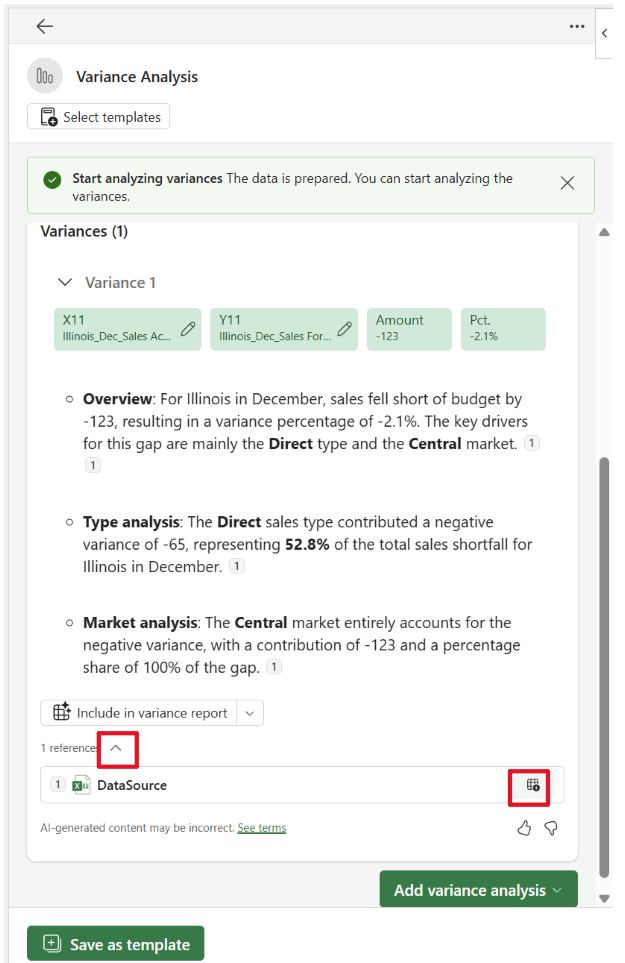
The source reference and report decision stay visible next to the variance analysis. Source: Microsoft.
The workbook has five planted problems
The first case is straightforward: subscription revenue is $160,000 below budget, and a note points to an approved forecast review. The skill should classify the result as unfavorable and keep the source ID attached.
The other cases are less tidy:
- Cloud hosting is materially over budget, with no evidence for the driver.
- Professional fees have a nonzero actual against a zero budget. The percentage should remain blank.
- A material travel variance has no owner.
- Two Product rows share the same source ID.
- One Operations row has no source ID at all.
The Expected Findings sheet shows the right amounts, direction, evidence status, and review issue. The Test Cases sheet verifies a test-run.
What happens when you run it
The skill begins by checking the workbook before touching it. Required columns include Period, Entity, Department, Account, Nature, Budget, Actual, Currency, Source_ID, and Owner.
If something is missing, Copilot should stop and name the missing fields. It should also find duplicate IDs, blank owners, zero budgets, mixed currencies, and nonnumeric amounts.
Copilot then presents a plan. Excel's Plan mode lets the user review the proposed approach before workbook edits begin.
After approval, the skill creates two sheets. Variance Review contains material findings and their source trail. Review Queue contains anything that still needs a person to decide or investigate.
Test it yourself
Add the monthly-variance-review folder to Copilot's OneDrive skills folder, then refresh the custom skills list.
Open a copy of the evaluation workbook. In Plan mode, invoke @monthly-variance-review and ask it to review August 2026.
Before allowing edits, check that Copilot found the right source table, period, thresholds, and output sheets. After the run, compare its work with Expected Findings and Test Cases.
Do not grade the answer by how professional it sounds. Check the six findings one by one. Start with the unsupported cloud overrun. Then confirm the zero-budget percentage stayed blank, the missing owner reached the review queue, and both source-ID problems were caught.
Record every miss. Change the skill or workbook rules, then run the same cases again.
Then, try on a live workbook
The synthetic file is just a smoke test. Passing it means the instructions survived a controlled example. It does not prove the skill is ready for a close package, board report, client deliverable, covenant calculation, journal entry, or investment decision.
The next test should use a masked copy of a completed reporting period. Add the exceptions your team already knows how to handle, add custom instructions and detail about your use case.
Compare AI-generated variance against past completed human ones for accuracy benchmarking.
Reinventing a finance workflow with an AI assistant is entirely possible, but treat it like an experiment: start with one bounded task, write down the hypothesis, and prove it against clean test cases before expanding the scope. When the tests expose a limitation, fix the workflow, tighten the controls, or reach out to our team and we’ll help turn it into something reliable enough to use.
References

Written by Lucas Erb
Founder of AI Experts